



Copy anything.
Find it in the notch.

Duplia remembers everything you copy — history, pins, and a shelf for your files. One keystroke away, invisible until you need it.

Download for Mac Purchase €14.99
Free beta · €14.99 once at launch · macOS 14+
FinderFileEditView
Tue 9:41 AM
Pasted
Try it — click the notch, use ↑ ↓ ↩︎ · or press V for the panel at your cursor
MailFileEditView
Tue 9:41 AM
https://duplia.app
#3F8CFF
NotchPanel(frame:)
Meeting moved to 10:30
Invoice_July.pdf
V
Pasted into Mail
Copy anything, like you always do.
Summon it with one keystroke.
Pick. Paste. Done.
No windows. No clutter. Just the notch.
Clipboard history

Duplia knows
what you copied.

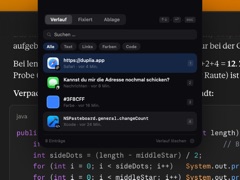
Links, images, colors, code, plain text — every clip is categorized automatically, tagged with its source app and timestamp. Not a raw text list. A history you’ll actually enjoy opening.

Pinned & frequently used

Star what matters and it stays on top. Things you paste often rise up on their own — zero management required.
PINNED
Kind regards, Felix
Mail · pinned
1
let panel = NotchPanel(frame: rect)
Claude · pinned
2
FREQUENTLY USED
On my way — 5 minutes!
Messages · used 14×
3

A shelf for your files

Drag any file up to the notch and it parks there — ready to be dropped into Mail, Slack, or a Finder window whenever you need it.
Screenshot.png
Invoice_July.pdf
Pitch-Deck.key
notes.txt

Opens right at your cursor

Prefer it closer? A floating panel appears next to your pointer — with adjustable glass transparency. Perfect on external displays.

HistoryPinnedShelf
↑↓↩︎esc
https://duplia.app
Safari · 4 min ago
#3F8CFF
Color · 16 min ago
Can you send the address again?
Messages · 8 min ago

No notch? No problem.

On external displays and older Macs the top edge stays perfectly clean — the panel simply materializes when you call it. Or disable the notch entirely and go shortcut-only.

https://duplia.app
Safari · just now
1
Meeting moved to 10:30 tomorrow
Mail · 1 hr ago
2
let panel = NotchPanel(frame: rect)
Claude · 24 min ago
3
Keyboard-first

Feels as good
as it sounds.

Hold ⌥ Option and tap V. Arrow through your history, hit return, and you’re done — with a soft click as your clip lands. Every sound is optional, every key remappable.

option
+
V
Go on, press them — or tap ⌥ V on your keyboard.
↑ ↓ select ↩︎ paste into the active app 1–9 instant paste switch tabs esc dismiss
Everything else

Small app. Sweats the details.

Spring-loaded animations

Automatic categories

Pins & frequently used

File shelf

Keyboard-first design

Delightful sounds & haptics

Private by design

Blazing fast native app

Nothing leaves your Mac.

Your clipboard is personal. Duplia stores everything locally, touches the network only for license checks and updates, and never records what password managers mark as confidential.

100% local storage No account No tracking Passwords never stored Exclude any app
Pricing

Pay once.
Keep it forever.

No subscription. No account. No “Pro” tier. Just an app you buy — like it used to be.

One-time purchase
14.99
Yours forever. No subscription,
no account, no upsells.
Download for Mac
Free while in beta · no card needed
What’s included
Full clipboard history & search Pins & file shelf Licence for up to 3 Macs All 1.x updates Notarized by Apple · fully offline
Instant license key by email · Secure checkout · VAT included · macOS 14+ · Apple Silicon
FAQ

Questions, answered.

Does Duplia work without a notch?
Yes — on any Mac. On displays without a notch the top edge stays completely clean: no icon, no pill, nothing. The panel materializes from the top edge when you press the shortcut, or opens right at your mouse cursor if you prefer. It also follows you across external displays and clamshell mode seamlessly.
Is it really a one-time purchase?
Really. €14.99 once, a licence you can use on up to 3 Macs, and every 1.x update included. If there’s ever a major version 2 with big new features, upgrading is your choice — never a forced subscription.
What about passwords and sensitive data?
Anything a password manager marks as confidential is never stored — Duplia respects the standard concealed-content flags. You can also exclude any app completely in the settings, so its copies never enter your history.
Why does it need the Accessibility permission?
Only so it can paste the selected clip directly into the app you’re working in. That’s the one permission Duplia asks for. Everything runs offline — the network is used solely for license validation and updates.
Which Macs are supported?
Any Apple Silicon Mac running macOS 14 Sonoma or later. A notch is not required — it’s just prettier with one.
Is my clipboard synced to the cloud?
No. Everything is stored locally on your Mac in a plain SQLite database inside your Library folder. No cloud, no sync, no telemetry — your clipboard history is yours alone.

Your clipboard deserves
a better home.

Download for Mac Purchase €14.99
Set up in under a minute. Seriously.